LMS User Guide
Everything you need to know about using the Learning Management System.
Certificate of Competency
Certificates of Competency are awarded to learners who complete Compcert‑tagged courses – these are discounted courses that fall under our categorized course offerings. After finishing the course, you may take a class‑level or individual assessment. Upon passing that assessment, the competency certificate is awarded immediately and can be accessed through CompTIA Central.
Take the Assessment
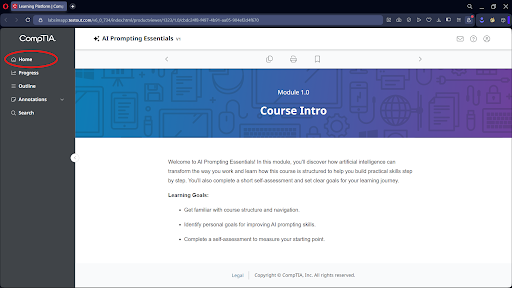
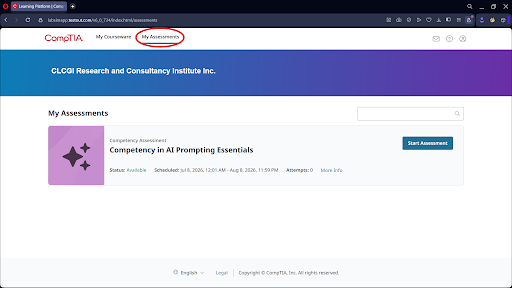
- Step 1: From the course homepage, navigate to Home → My Assessments.
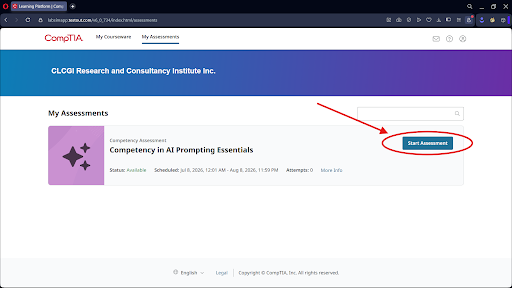
- Step 2: Click Start Assessment (a new tab will open).
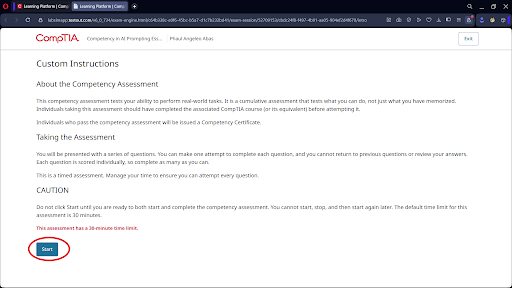
- Step 3: Click Start when you're ready to begin the exam.
Step 1: After finishing the course click Home > My Assessments
Step 2: Click Start Assessment
Step 3: It will redirect you to a new tab. If you are ready, click Start.
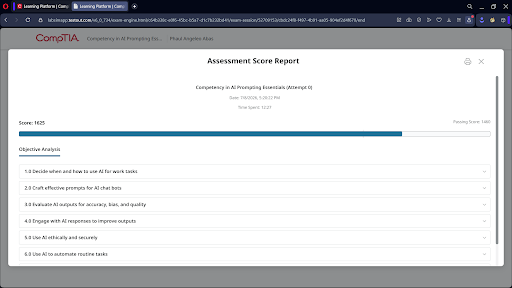
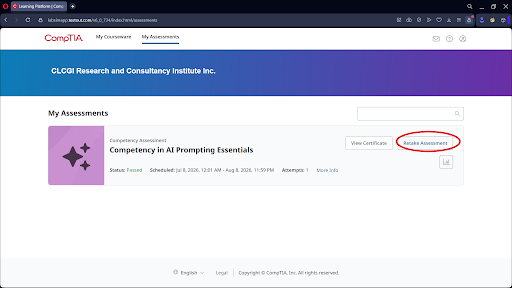
After Completing the Assessment
- Check whether you passed.
- If you need or want to retake the assessment, confirm with your instructor how many attempts are allowed.
Step 4: After finishing the assessment, check if you passed. You may retake the exam in the event that you desire or need to. Refer to your instructor to know how many attempts you may take.
Download Your Certificate
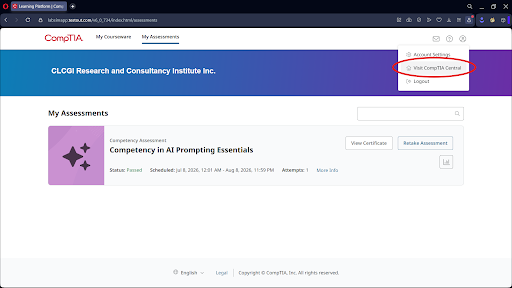
- Step 1: Click Visit CompTIA Central.
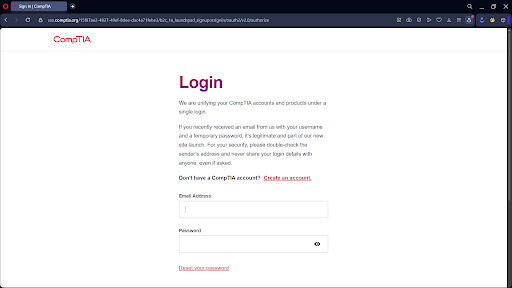
- Step 2: Sign in using the same email address you used for the CLCGI site. If you don't have an account yet, create one using that same email address.
- Step 3: After signing in, click Study on your completed course.
- Step 4: Navigate to Home → My Assessments.
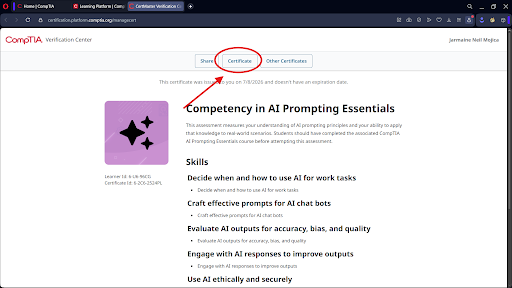
- Step 5: Click View Certificate (this will open a new tab).
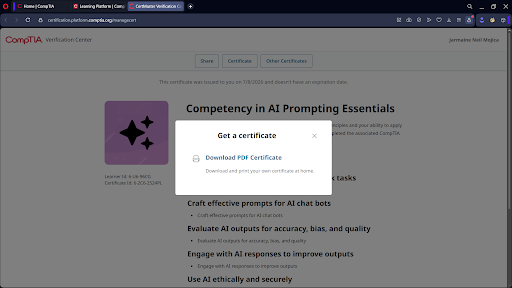
- Step 6: Click Certificate, then download your certificate.
Step 5: To view and/or download your Certificate. Click Visit CompTIA Central.
Step 6: You will be prompted to enter your credentials. Enter the same email address you used in the CLCGI site. You may create a new account if you haven't.
Step 7: Upon logging in, click Study on the course that you have completed.
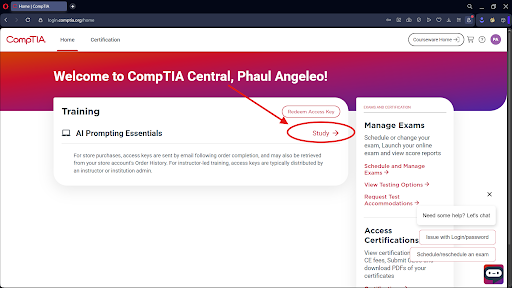
Step 8: Click Home > My Assessments > View Certificate
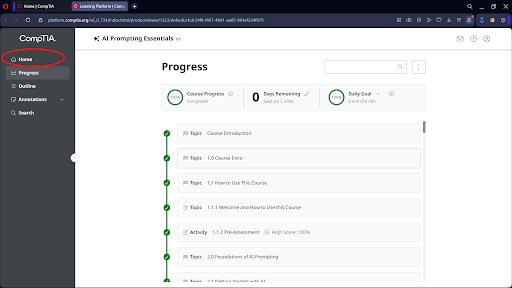
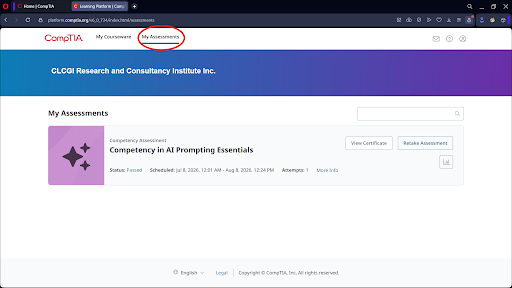
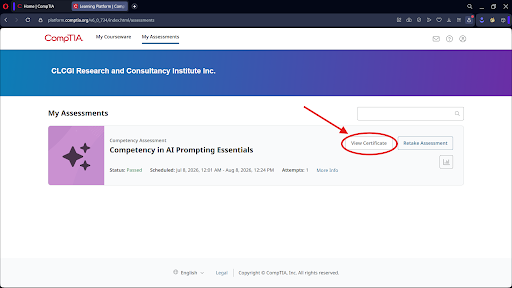
Step 9: You will be redirected to a new tab. Click Certificate then you may download it.
Tip: Certificates of Competency complement industry certifications like CompTIA by providing focused, practical validation of your skills. They are ideal for professionals, students, and career‑changers looking to quickly demonstrate their competencies.
If you have questions about Compcert‑tagged courses, assessment procedures, or certificate access, please contact our support team – we're here to assist you.
Certification Exams
Certification Exams provide you with a voucher and a selection of exam dates. All exams are conducted in person at our official exam centers; details will be included with your voucher. You may opt to take only the exams to earn the corresponding certification.
CompTIA certification exams validate the skills and knowledge required for diverse technology roles. These exams are developed through a rigorous process that incorporates industry feedback and subject matter experts, ensuring they meet high standards. CompTIA offers high‑quality training materials and live online training to help candidates prepare. However, successful completion of these materials does not guarantee exam passage, as they are independently created from the certification exams.
Here you can find information about the CompTIA certification exams.
Exam Development
CompTIA exams are built by the industry, for the industry. Content is derived from a combination of industry‑wide survey responses and contributions from our subject matter experts. This results in a rigorous exam development process representing thousands of hours that exceed industry knowledge standards.
Below are key considerations in developing a high‑stakes certification exam and how CompTIA addresses them.
Subject Matter Experts (SMEs)
Subject Matter Experts participate in focus groups, item writing, and item review sessions. CompTIA estimates that approximately 5,000 SME hours are required to develop a single exam.
Psychologist / Psychometrician
A trained psychologist/psychometrician supports the development, review, and maintenance of the exam, ensuring the test and its development process are legally defensible. Our exam development process for all certifications adheres to and exceeds the following test development standards:
- Uniform Guidelines on Employee Selection Procedures (issued by the U.S. Equal Employment Opportunity Commission)
- The Standards for Educational and Psychological Testing (published by the American Educational Research Association, the American Psychological Association, and the National Council on Measurement in Education)
Additionally, CompTIA A+, CompTIA SecurityX, CompTIA Cloud+, CompTIA Cybersecurity Analyst (CySA+), CompTIA Linux+, CompTIA Network+, CompTIA PenTest+, and CompTIA Security+ certifications are accredited by the ANSI National Accreditation Board (ANAB) under the ISO 17024 standard.
CompTIA
CompTIA – the Computing Technology Industry Association – is a leading non‑profit trade association that has been advancing the IT industry since its founding in 1982. With a mission to empower individuals and organizations through education, certification, and advocacy, CompTIA has become a globally recognized authority in information technology.
CompTIA is best known for its vendor‑neutral IT certifications, which validate foundational and specialized skills across a wide range of technology domains. Its certification portfolio includes:
- CompTIA IT Fundamentals (ITF+) – An entry‑level credential for beginners exploring IT.
- CompTIA A+ – The industry standard for IT support and technical troubleshooting.
- CompTIA Network+ – Validates networking knowledge and hands‑on skills.
- CompTIA Security+ – Core cybersecurity certification trusted by governments and enterprises.
- CompTIA CySA+ – Focused on cybersecurity analytics and threat detection.
- CompTIA PenTest+ – Ethical hacking and penetration testing.
- CompTIA Linux+ – Covers Linux administration and open‑source technologies.
- CompTIA Cloud+ – Validates cloud infrastructure and security knowledge.
- CompTIA SecurityX (formerly CASP+) – Advanced security certification for senior practitioners.
CompTIA certifications are developed through a rigorous, industry‑driven process involving subject matter experts from around the world. They are designed to be performance‑based, ensuring that certified professionals are job‑ready from day one.
Beyond certifications, CompTIA provides research, advocacy, and community resources to help IT professionals at every stage of their career. Whether you are starting your first IT role or advancing to senior positions, CompTIA offers a clear and credible pathway to achieve your goals.
Tip: Many of our courses and package programs align with CompTIA certification objectives. Earning a CompTIA certification can significantly enhance your employability and demonstrate your commitment to excellence.
For more information about CompTIA and its certifications, visit the official CompTIA website or explore the certification sections within our LMS.

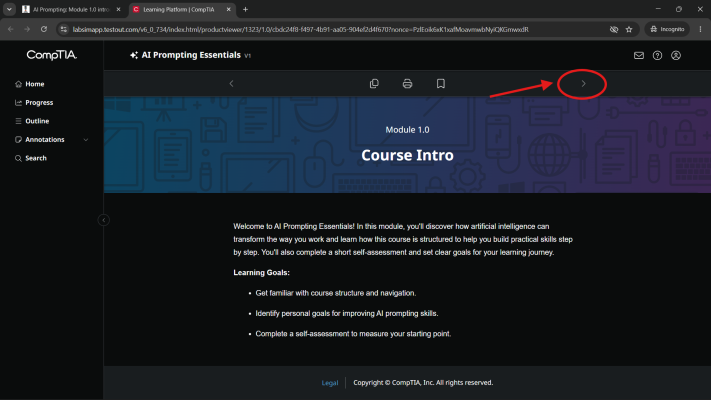
Navigating Course Modules: While taking a course, you can move between modules by clicking the < (Previous) and > (Next) navigation buttons located within the course interface, as shown in the image below. These buttons allow you to quickly navigate to the previous or next module without returning to the course homepage.
Discounted Courses
Our Discounted Courses feature official CompTIA learning materials at prices lower than standard retail rates. Learners automatically receive a 10% discount, with additional savings available through eligible promotional vouchers.
These courses are self-paced, allowing you to study anytime and progress at your own pace. The learning materials are specifically designed to help you prepare for CompTIA certification exams by covering the objectives and concepts required for each certification.
Important: CompTIA training courses and certification exams are separate products. Completing a course helps you prepare for the exam but does not guarantee that you will pass the certification exam.
How to Access Discounted Courses
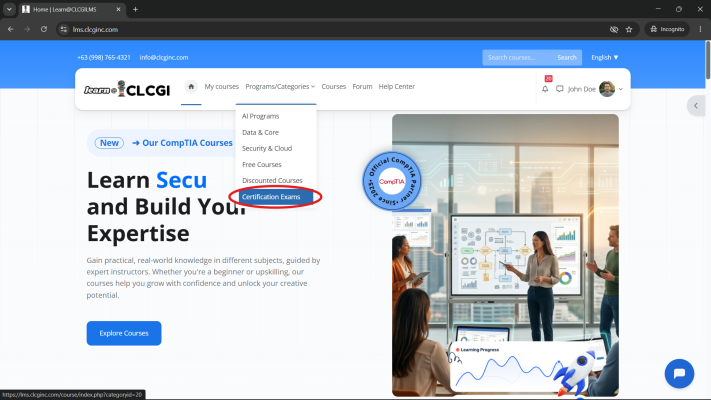
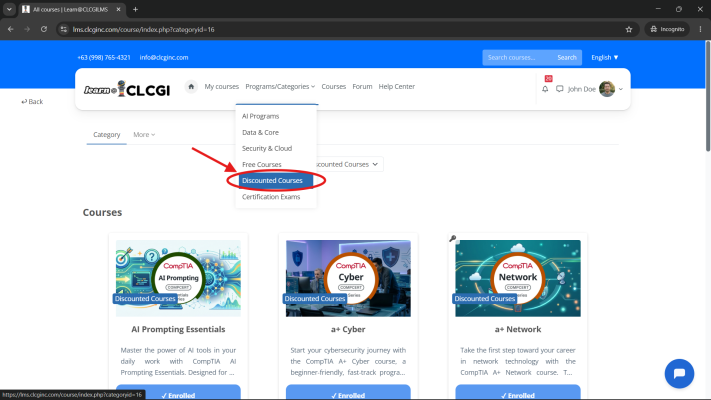
- From the main navigation menu, click Programs/Categories.
- Browse the available Discounted Courses.
- Select the course you wish to enroll in and proceed with registration or purchase.
Tip: Watch for promotional vouchers and special offers to maximize your savings on eligible CompTIA courses.
Enrollment & Payments
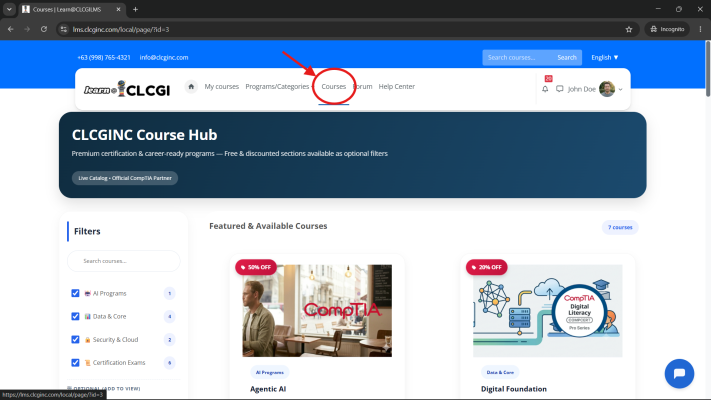
To enroll in a course, first browse the available offerings under the Courses tab in the main navigation bar. Once you find a course that interests you, click on it to view the course details page.
On the course details page, click the Enroll button. This will take you to the secure checkout page, where you can review your order and proceed with payment.
At checkout, you have the opportunity to apply any coupon or voucher codes you may have. Enter your code in the designated field to receive additional discounts on your purchase.
After completing the payment process, you will gain immediate access to the course materials and can begin learning at your own pace.
- Step 1: Navigate to the Courses tab and select your desired course.
- Step 2: Click Enroll to proceed to checkout.
- Step 3: Enter any coupon or voucher codes to apply discounts.
- Step 4: Complete your payment to finalize enrollment.
Need help? If you encounter any issues during enrollment or payment, please contact our support team for assistance.
Forgot Password
If you have forgotten your password, you can easily reset it by following these steps:
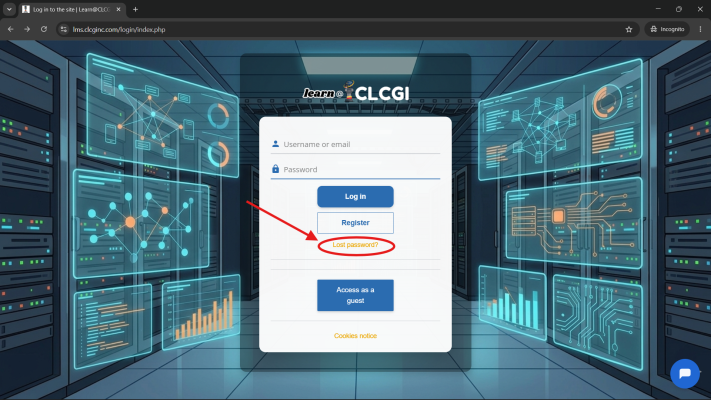
- Step 1: On the login page, click the Forgot Password link located below the login form.
- Step 2: You will be prompted to enter either your registered email address or your username.
- Step 3: After submitting your information, we will send a password reset link to the email address associated with your account.
- Step 4: Check your inbox (and spam/junk folder) for the email. Click the link provided to be taken to a secure page where you can create a new password.
- Step 5: Choose a strong password, confirm it, and submit. You can then log in with your new credentials.
Tip: If you don't receive the reset email within a few minutes, double‑check that you entered the correct email or username, and ensure your email provider is not blocking messages from our system.
If you continue to experience issues, please contact our support team for further assistance.
Forum
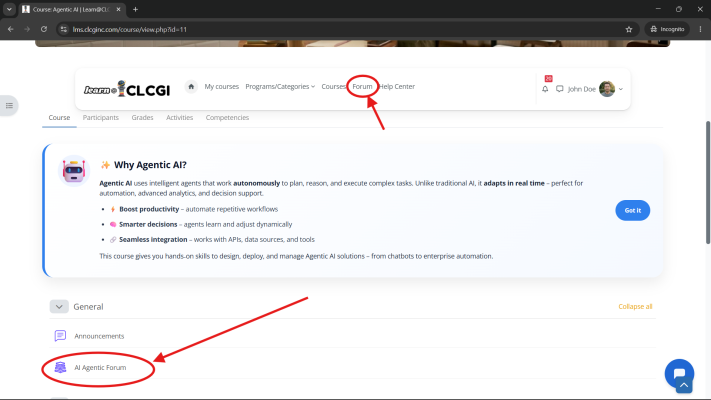
Each course includes its own dedicated discussion forum to facilitate collaboration, questions, and knowledge sharing. The forum is a great place to connect with instructors and fellow learners, discuss course topics, and get help when you need it.
To access a course forum:
- Step 1: Navigate to the course you are enrolled in.
- Step 2: In the General section of the course page, locate the forum link labeled "[Course Name] Forum" (the course name will appear in place of the brackets).
- Step 3: Click the forum link to enter the discussion area.
Once inside, you can:
- Browse existing discussion threads and read posts from others.
- Start a new thread by clicking the Add a new discussion topic button — give it a clear subject and describe your question or comment.
- Reply to existing posts to continue conversations or offer assistance.
Tip: Use the forum actively to deepen your understanding and build connections with peers. Instructors monitor the forums and typically respond within 24–48 hours.
Remember to keep discussions respectful and on‑topic. For technical issues unrelated to course content, please contact support directly.
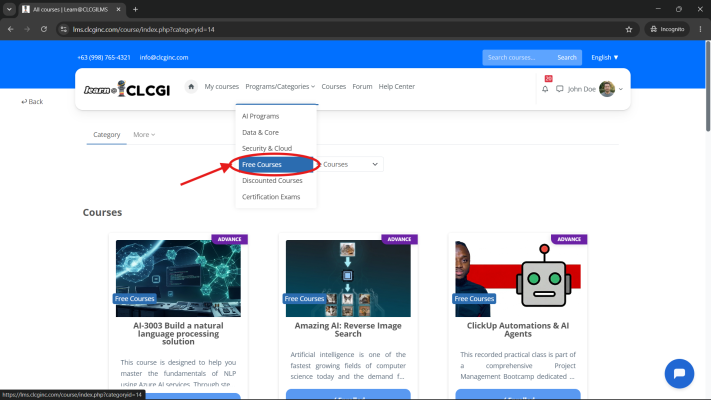
Free Courses
Our Free Courses offer a wide range of learning materials divided into two categories:
- Basic: Designed for students and beginners who are new to the subject. These courses cover foundational concepts and essential skills.
- Advanced: Tailored for professionals and experienced learners seeking to deepen their expertise and tackle complex topics.
Access to these courses is determined by your subscription plan. We offer both monthly and annual subscription options:
- Standard Plan: Grants access to Basic courses only.
- Professional Plan: Unlocks both Basic and Advanced courses, giving you full access to our complete library.
Tip: If you are a professional or looking to advance your skills quickly, the Professional Plan offers the best value. Annual subscriptions come with additional savings compared to monthly billing.
To view your current subscription level and upgrade if needed, visit your account settings or contact our support team for assistance.
Log-in
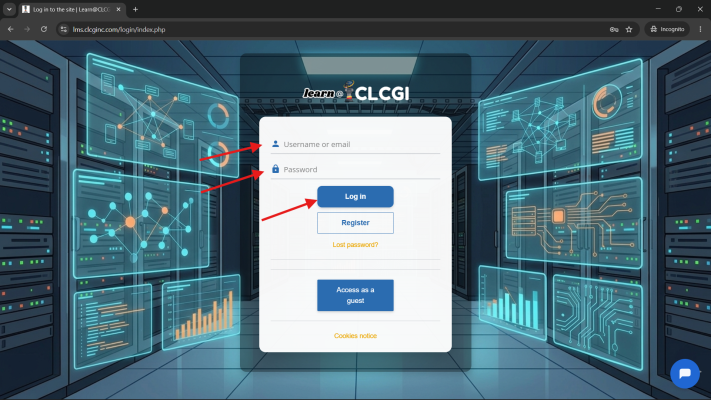
To log in to your account, follow these simple steps:
- Step 1: Navigate to the homepage of our LMS.
- Step 2: Click the Log-in button located in the top‑right corner of the page.
- Step 3: Enter your registered username or email address in the appropriate field.
- Step 4: Enter your password.
- Step 5: Click the Log-in button to access your dashboard.
If you cannot remember your password, simply click the Forgot Password link on the login page. This will guide you through the process of resetting your password (see the Forgot Password section for detailed instructions).
Tip: For security, always log out after each session, especially when using shared or public devices. Keep your credentials confidential and avoid using easily guessable passwords.
If you continue to experience login issues, please contact our support team for assistance.
My Courses
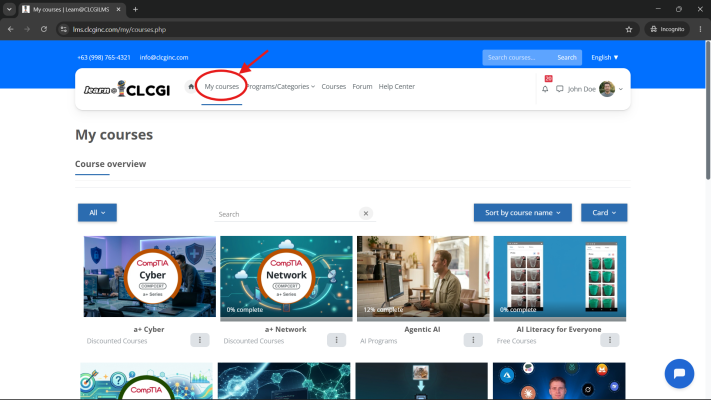
The My Courses section is your personalized dashboard that displays a complete collection of all the courses you are currently enrolled in. It serves as your central hub for accessing and managing your learning materials.
From this section, you can:
- View your courses: See a clear list of all courses you are enrolled in, organized for easy access.
- Access course content: Click on any course to enter and start learning, view materials, and track your progress.
- Monitor your progress: Quickly see your completion status and how far you've advanced in each course.
- Continue where you left off: Easily resume learning from your last activity in any course.
To access the My Courses section, simply log in to your account and look for the My Courses option in the main navigation menu or on your dashboard. This section automatically updates as you enroll in new courses.
Browsing All Available Courses
If you're looking to discover new learning opportunities, the Courses tab in the main navigation bar displays the complete catalog of all available courses. From there, you can:
- Filter courses: Use the filter options on the left‑hand side to narrow down courses by category, level, or other criteria.
- Enroll directly: Click the Enroll button on any course listing to be redirected to the checkout page and complete your enrollment.
- Preview course details: Click View More to see an overview of the course content, objectives, and requirements before making a decision.
Tip: Use the filters to quickly find courses that match your interests or skill level. The View More option is a great way to ensure the course fits your learning goals before enrolling.
If you believe a course is missing from your enrolled list or you're having trouble accessing the catalog, please contact our support team for assistance.
Package Programs
Our Package Programs are specially curated learning pathways designed to provide a comprehensive education and recognized certification in a specific specialization. Each program follows a structured progression that builds your knowledge step by step, ensuring you gain both theoretical understanding and practical skills.
A typical Package Program consists of the following four levels:
- Level 0: Orientation Module – An introductory module that familiarizes you with the program structure, learning platform, and key resources. It sets the foundation for your learning journey.
- Level 1: Self‑Paced Course – A flexible, self‑directed course that allows you to study at your own pace. This level covers core concepts and foundational knowledge essential for the specialization.
- Level 2: Instructor‑Led Learning – Live, interactive sessions led by experienced instructors. These classes provide deeper insights, real‑world applications, and the opportunity to ask questions and engage with peers.
- Level 3: Certification Exam – The final step, where you take the official certification exam to validate your skills and earn your credential. A voucher is provided as part of the program.
Completing all levels successfully will equip you with the expertise needed to excel in your chosen field and demonstrate your competence through industry‑recognized certification.
Tip: Package Programs are ideal for learners who prefer a guided, end‑to‑end learning experience. They ensure you don't miss any critical steps and provide a clear roadmap to certification.
If you have questions about which Package Program is right for you, or need assistance with enrollment, please contact our support team — we're happy to help.
Registration
To create a new account and start your learning journey, follow these steps:
- Step 1: Navigate to the homepage and click the Log-in button located in the top‑right corner.
- Step 2: On the login page, click the Register link to access the registration form.
- Step 3: Fill in all required fields with accurate information, including your full name, email address, and desired username.
- Step 4: Create a password that meets the security requirements:
- Must be at least 10 characters long.
- Must not exceed 24 characters.
- Must include at least one special character (e.g., !, @, #, $, etc.).
- Step 5: Confirm your password and review the terms and conditions.
- Step 6: Click Register to submit your details.
After successful registration, you will receive a verification email at the address you provided. Click the link in that email to activate your account. Once verified, you can log in and start exploring our courses.
Tip: Use a strong, unique password that you don't use for other services. Consider using a password manager to generate and store it securely.
If you don't receive the verification email within a few minutes, check your spam or junk folder. If the issue persists, contact our support team for help.